Four ways to start
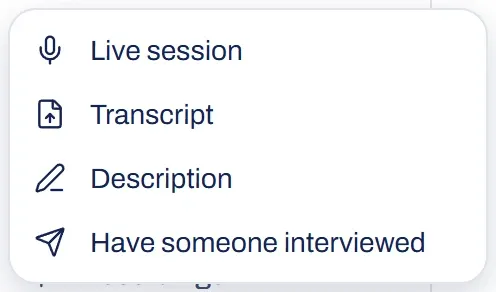
You can start a board from a conversation you’re having now, one that has already happened, a few sentences, or by hand. After that everything works the same: the same board, the same analysis and the same exports.
| Start | What you need | Choose |
|---|---|---|
| A conversation you’re having now | someone who does the work and a microphone (typing works too) | Live session |
| A conversation that has already happened | a transcript, document or recording | Transcript |
| A few sentences | a text about how the work runs | Description |
| Drawing it yourself | nothing | Draw it yourself |
A conversation you’re having now
- Choose Live session.
- Say briefly what it’s about (you can speak it) and click Start session.
- Click Start listening. Brownpaper builds the board quietly while you lead the conversation. The session doesn’t listen until you click.
If you want Brownpaper to ask follow-up questions where something’s missing, choose Interview mode in the menu next to the button and click Start interview. You can switch modes as long as nothing is running. The difference is explained in listen in or interview. If the conversation happens in an online call, here’s how that works.
A conversation that has already happened
- Choose Transcript.
- Paste the text of the conversation, or choose a file: .txt, .md, .html, .docx, .pdf, or a recording (mp4, mov, m4a, mp3, wav or webm, in Dutch or English).
- For a recording, click Transcribe first. This takes a few minutes, and you’ll find the result under Recordings.
- Under Layout, choose Automatic, One board or Split into processes to get one board, or an overview with a board per process.
- If Brownpaper found speakers, give them names under Who is who?.
- Click Read the transcript to see what you’ll get and in which language. Only then click Draw the board.
A few sentences
Choose Description. Paste or type how the work runs, in the order it happens, or choose a file. Mention the steps, who does them, where choices are made and how it ends: Brownpaper doesn’t draw what you leave out. Click Draw the board.
The board appears on its own, which takes a moment. Brownpaper then reads it through once more. The intake now says what it’s about and where it starts and ends. To change that, turn on Edit and choose More while editing › Adjust intake. If something’s missing, add it on the board.
Draw it yourself
Choose Draw it yourself. An empty board opens straight away in the project you’re in, with no intake and no model. Edit is already on, so the bar under the toolbar is there for you to click or drag a card, a lane or a note from. For more on drawing, see working on the board.
On any empty board, the This board is still empty card also offers Draw it yourself: it turns Edit on and closes the card. You can fill in an intake later under More while editing › Adjust intake.
Draw it yourself isn’t available on a phone, because there’s no bar to draw from.
Other ways in
- Have someone interviewed: someone gets their own link, tells their story, and Brownpaper asks the questions.
- Restore a board: choose the JSON of a board, or a zip you exported earlier.
- Example board: look around a complete board with the conversation alongside. You can’t change anything there.
Something not working?
My file isn't being read
Brownpaper reads .txt, .md, .html, .pdf and .docx. Open a Word file in the old format (.doc) in Word and save it as .docx or PDF. A video without an audio track can’t be read: export the sound as m4a or mp3. If a file is too large, the message says how large it may be. Save it smaller, or paste the text.
My recording isn't ready yet
Transcribing can take a few minutes. You can leave the page: the recording is under Recordings, and when it’s ready you choose Make board there. Brownpaper doesn’t keep the audio, only the transcript.