Organisation, members and roles
Your organisation is the group you make boards in together. The boards, projects, credits and house style belong to it, not to you. You invite colleagues by email and choose their role: owner, admin or member.
Invite someone
- Choose Invite someone above the member list. If you’re the only member so far, the same option is below the list.
- Enter the email address and choose a role: Member or Admin. You can make someone an owner afterwards, in the member list.
- Choose Send invitation.
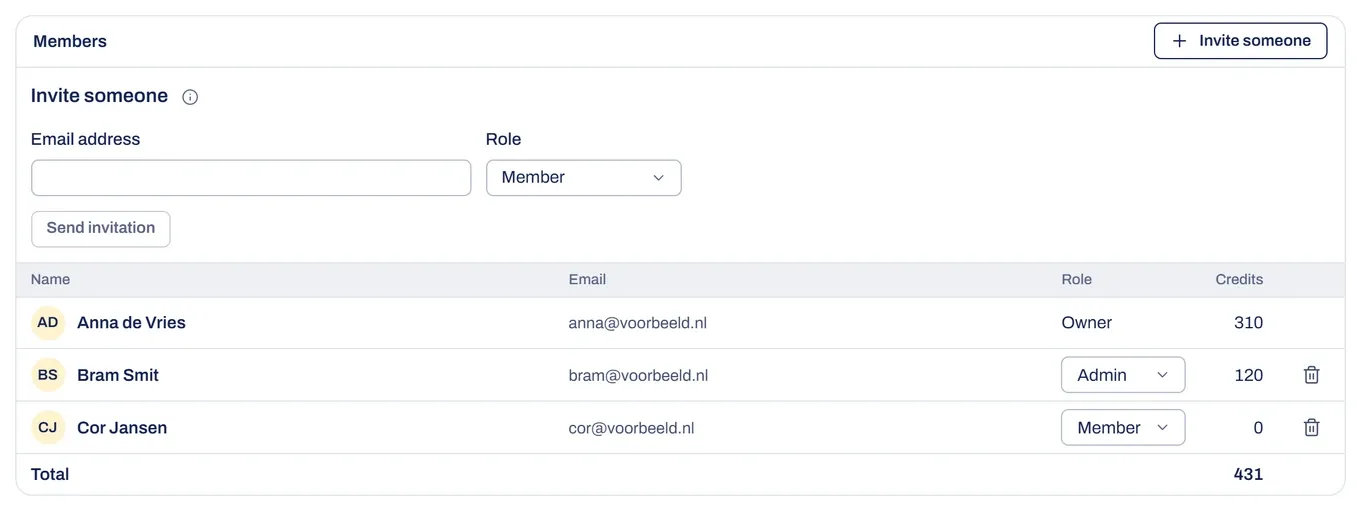
They get an email in your language with a Join button. They use it to sign up or log in with that address, and then they’re working in your organisation straight away. If someone signs up with an address that has an open invitation, they also join your organisation right away instead of getting one of their own.
Invitations and seats
You can always invite people. An invitation doesn’t use a seat. That only happens when someone accepts it. If all seats are taken, the person can’t join yet. The invitation stays, and the same link works once a seat is free. At the top, Seats shows how many seats are in use. The owner can add more with Buy seats.
Open invitations are in the same table under Pending invitations, with the date they expire. Use Withdraw to withdraw one, and its link stops working. An address that’s already a member or already invited doesn’t get a second invitation.
Roles and permissions
- Member works on boards and sees the member list. Members see only their own credit usage. They can see the house rules, house style and logo, but can’t change them.
- Admin can do everything a member can, plus invite people and withdraw invitations, change the role of members and admins, remove members and admins, change the house rules, house style and logo, and see everyone’s usage. Admins can’t change or remove an owner, and can’t make anyone an owner.
- Owner can do everything an admin can, plus change or remove owners, make someone an owner, rename the organisation, manage the subscription and buy extra credits, let Brownpaper look along, and delete the organisation.
A new role applies immediately.
Remove a member
In the member list, choose the bin icon on the row and confirm. The member loses access straight away and the seat becomes free. The boards they made stay with the organisation, private boards stay hidden from others, and their credit usage keeps counting under Former members (combined). The account itself stays.
Switch organisation
If you’re in more than one organisation, the account menu (your initials) has an option under Working in. Switching reloads the app: the overview, projects, balance, house style and settings are then those of the organisation you picked.
Something not working?
I can't invite anyone
Only owners and admins can invite. Every member sees the member list but can’t change it.
The person I invited sees that all seats are taken
The invitation stays valid. Once a seat is free, for example because a member leaves or the owner buys more seats, the same link works.
It says the invitation is for a different email address
Log in with the address the invitation was sent to. An invitation only works for that address, and the address has to be confirmed.
It says the invitation has expired or was withdrawn
Ask the person who invited you for a new one. If the invitation is still open in the list but the email never arrived, choose Withdraw and invite the address again.