Add and process comments
Leave what’s wrong or missing as a comment on a card, arrow, note or the whole board. Then have Brownpaper propose, per comment, what changes. You choose what goes through, and Revert takes back everything from one round of processing in one go.
Add a comment
- Open Review.
- Right-click a card, arrow or note, or the mark showing the number of comments on it: the window opens straight away. For the whole board, type in the field at the top of Comments; right-clicking an empty spot does nothing. If right-clicking doesn’t work, as on a phone, open the panel of the card or arrow and click Comment.
- Type what’s wrong or missing and click Post. Ctrl+Enter does the same, and Enter starts a new line.
If Review is closed, right-click a card, arrow or note and choose Add a comment. Only the window opens, where you clicked; Review stays closed. After Post, Comment posted shows briefly at the bottom left and you carry on working. The comment is then in Review, like any other. This works in 2D, 3D and BPMN.
If you close the window with Escape or by clicking outside it, what you typed stays. To change your own open comment, click its text. The bin removes it, after Yes, remove. Just placed it and haven’t changed the board since? Then Ctrl+Z removes it too (undo). Comments never appear on the board itself, only in Review.
Write a comment Brownpaper can act on
Brownpaper does what the comment asks and nothing else. A name, duration, frequency, total, role, system or step goes on the board only if you mention it. “Check quote is missing between these two cards” works, “a step is missing” doesn’t.
Brownpaper doesn’t act on the following. The comment then says Not done and why.
- Moving a card: the board decides where cards go. Use Arrange for that.
- Redrawing the whole board, or renaming or removing most of the cards: give an instruction with Instruct the board.
- Answering a question: as far as the board shows the answer, it’s under Not done.
- Marking a bottleneck or contradiction: that needs a quote from the conversation.
- Changing or removing notes, risks and controls: whoever wrote them does that.
If a comment tells Brownpaper itself what to do, such as ignoring the rules, Brownpaper doesn’t follow it.
Process comments
- Under the open comments, click Process the comments, with the number after it. Without an open comment, the button is greyed out. It uses your organisation’s credits, like an instruction.
- Keep working. What Brownpaper is doing says Processing comments… until it’s done.
- The panel shows the Proposal: per comment what changes, per card which field gets which value, with the old value crossed out. Everything is ticked, so untick what you don’t want. A comment you changed or removed after the proposal doesn’t go through.
- Click Apply. Everything that’s ticked goes onto the board in one go. Discard throws the proposal away and leaves the comments open. If you close the panel, the proposal stays until you choose.
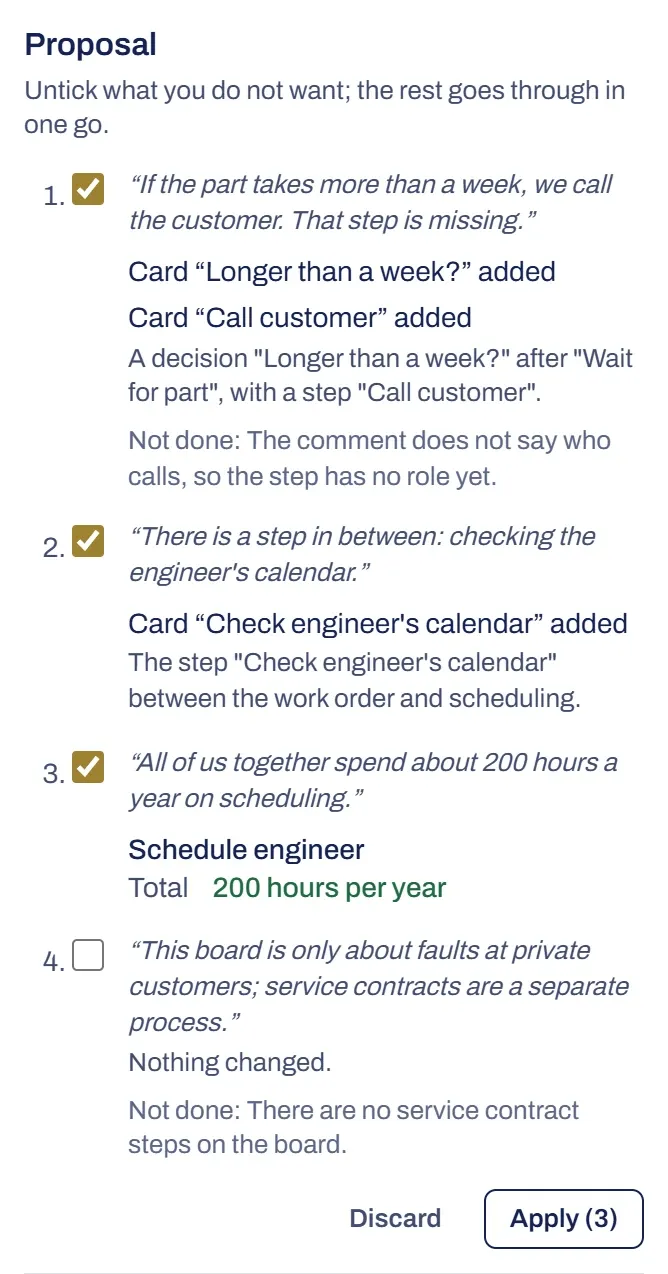
Processed comments
Processed comments are grouped per round, the newest on top, with Processed next to them. Under What changed you’ll see what changed on the board, and what didn’t and why. A comment that led to nothing is listed here as processed too. If you still want it, add a new comment with what was missing.
Revert takes away what that round put on the board in one go, even if more was added afterwards. The comments are open again. With the bin you clear the processed comments of that round: what they put on the board stays, and the Revert button of that round goes with them. You can still undo with Ctrl+Z or in the log.
Something not working?
I can't add a comment
If there’s a message at the top of the panel, Review isn’t in your organisation’s plan. You can still read the comments that are there, and remove them as always: your own open comment, and processed ones with the bin. If a proposal is still waiting, you throw it away with Discard. Adding, changing and processing work again as soon as the plan has it; the message says how.
The button to process is greyed out
There’s no open comment. Add one first, or revert a processed round with Revert: its comments are open again.
It says Processing didn't work
The message gives the reason. Dismiss the message and click Process the comments again.
It says No longer fitted the board
The board changed after the proposal, and what the comment asked for no longer fit. The comment says why. If you still want it, add a new comment.