Connect an AI assistant
You connect Brownpaper to your own AI assistant with a single address: Claude, ChatGPT, Gemini, Copilot or any other that can add MCP servers. The assistant can then search and read your boards, draw a board from a transcript or description, give a board an instruction, and export it. It works on your behalf, in one organisation, and anything that uses AI comes out of that organisation’s credits.
Connect
The address of the connection is https://app.brownpaper.ai/api/mcp. Paste it into the assistant. You’ll also find it under Connect AI, with a copy button and the steps for each assistant.
What you do next depends on the assistant:
- Claude, including Claude Code
- ChatGPT
- Gemini, including Gemini Enterprise
- Microsoft Copilot, through an admin or in Copilot Studio
- Another assistant, such as GitHub Copilot in VS Code, Gemini CLI or Cursor
They all end the same way: you arrive at Brownpaper, sign in and see what the assistant is asking for.
Give permission
The screen shows which assistant is asking for access, the address you’ll return to afterwards, the email address you’re signed in with and the organisation the assistant will work in. If you’re in more than one organisation, choose one here. Below that, each kind of action shows what the assistant may do and whether it costs credits. Show all actions lists every action separately.
Choose Allow to connect, or Deny to stop. The assistant only sees the boards and processes in that organisation that you can see too.
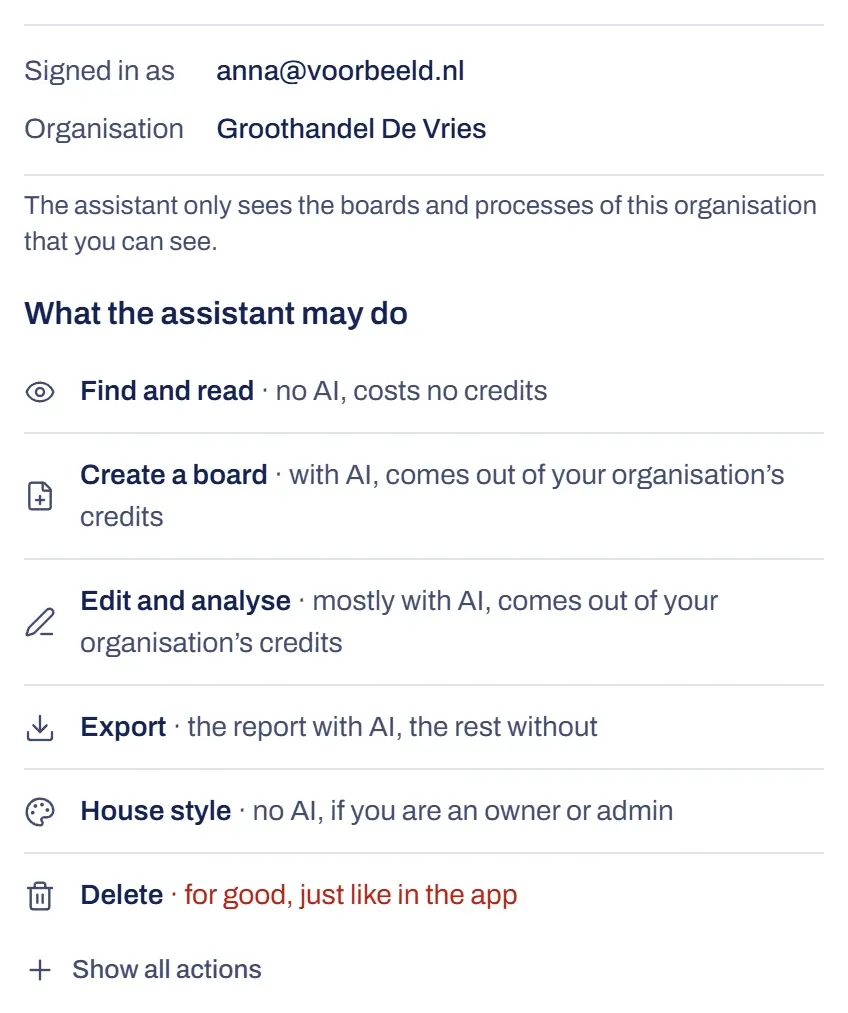
Capabilities
The assistant picks what fits your question; you don’t need to know any names.
- Find and read: search boards and projects, read a whole board, look at your interviews, check whether a board is finished. No AI, so no credits.
- Create a board: draw from a transcript, or from a description in your own words. Costs credits.
- Edit and analyse: ask a question about a board, give it an instruction, start an analysis (with bottlenecks, risks and controls), or apply suggestions to simplify. Most of this costs credits.
- Export: BPMN, Mermaid and Excel without AI, the report with AI.
- House style: read your organisation’s house style and copy it from your website. No AI, and only if you’re an owner or admin.
- Delete: a board you created, permanently. The assistant names the board first and asks if you’re sure.
You undo an instruction from the assistant in Brownpaper, like any other change. Drawing a board, giving an instruction and running an analysis take a while. The assistant checks on its own whether the work is finished, and reports what changed and what didn’t work.
Only in Brownpaper
Payment, members and invitations, switching organisation and admin all happen in Brownpaper itself, not through an assistant. The assistant can look at interviews but can’t send them. It can only read comments, and only on boards you’re allowed to edit. Removing the logo or resetting the whole house style is also something you do yourself.
Revoke access
Under Connect AI you’ll see the assistants that work on your behalf, with their organisation and the date they connected. The Disconnect icon next to an assistant removes the connection. It takes effect immediately, with no confirmation. Nothing is lost: the assistant’s next request is refused, and if it wants access again, it asks for permission again. You can only disconnect in Brownpaper itself.
Something not working?
I see no Allow, only a notice
The connection isn’t available in that organisation. The notice says so and doesn’t show Allow. If you’re in more than one organisation, choose one where it works, or ask the organisation’s owner.
The screen says the request has expired
A request from the assistant is only valid for a short time. Choose Start again to get a new one. If that doesn’t work, start again from the assistant.
After signing in I don't get back to the assistant
Sign in with the same browser the assistant sent you to Brownpaper from. If you open the sign-in email somewhere else, the connection can’t find its way back.
The assistant says the connection has expired or was revoked
Connect Brownpaper again in the assistant. The connection is gone, for example because you disconnected it under Connect AI.
The assistant says something can only be done in Brownpaper
That’s correct: payment, members, invitations and admin don’t go through an assistant. Do it in Brownpaper itself.
The assistant reports too few credits
Anything that uses AI comes out of the credits of the organisation you chose when you allowed access. When those run out, the assistant can’t do anything that needs AI; reading and searching still work. See Credits.